 Finzy
Finzy
Say it out loud
Press the microphone and say what you spent. Finzy writes down the amount, the shop and what kind of spending it was.
Say it, scan the receipt, or type it in — about five seconds either way. Finzy fills in the rest, and everything stays on your phone.


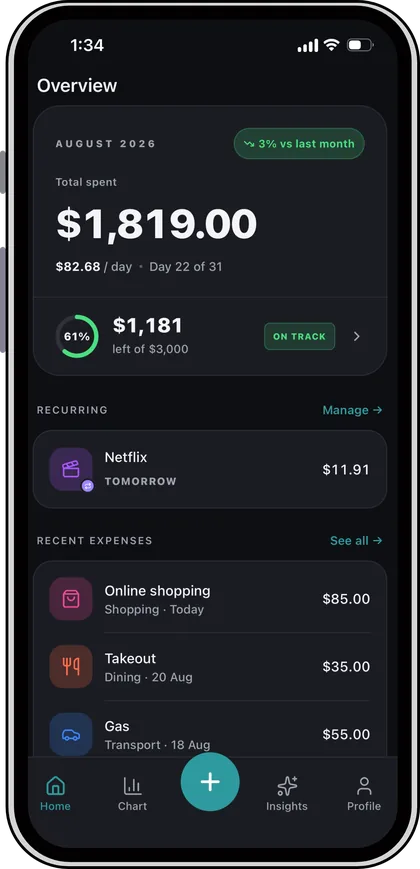
Say it out loud, take a photo of the receipt, or type it in yourself.
Press the microphone and say what you spent. Finzy writes down the amount, the shop and what kind of spending it was.
Point your camera at the receipt. Finzy reads the total, the shop and the date off it for you.
Big buttons, large numbers, and your usual categories right there on the same screen.
Four cards that build themselves from what you log, and update as you go.
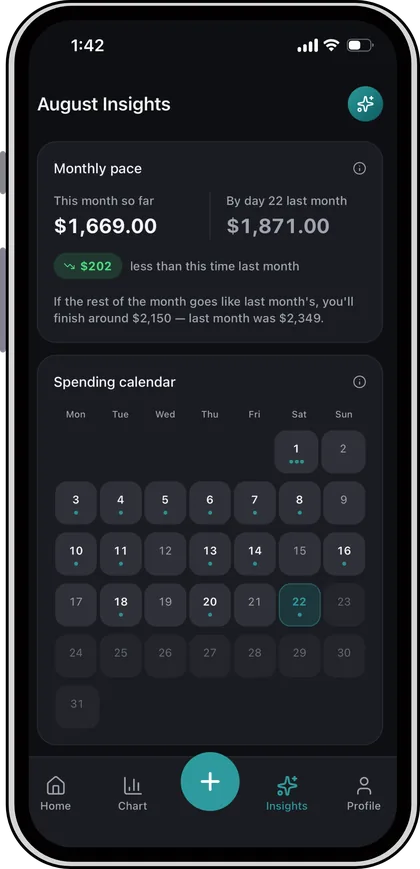
It reads your own records and answers in plain English.
Add a Finzy widget and the keypad, voice and receipt scanner are one tap away — no need to open the app first.

Your busiest days, your quietest ones, and how it all compares with last month.
Which days of the week you spend on, and which you never do.
Your longest run without spending, and how it compares.
What went up, what came down, and which category moved most.
Mark rent, loans and subscriptions once. Finzy reminds you the day each one is due.
A monthly cap plus per-category limits, suggested from what you really spent.
Any range to a CSV file — this month, this year, or everything you have logged.
Optional. Your email and a 6-digit code, and your expenses follow you to a new phone.
Finzy works offline, shows no ads, and never sells your data.